
Keep your customer information up-to-date
Knowing you, helps us protect you.
Knowing you is a top priority for us – it’s the way we do business.
The more we know about you, the better we are able to protect you should we identify any unusual activity on your account.
To serve you better we ask that you periodically update your customer profile. You may do this using the convenience of the Scotia Mobile App, or you may visit the branch.
How to update
Scotia Caribbean mobile app
Branch
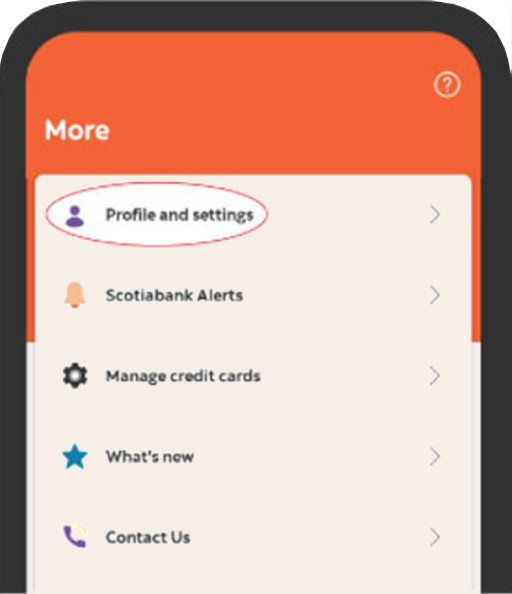
- Log in to the Scotia Mobile App
- Click on More at the bottom right corner
- Select Profile
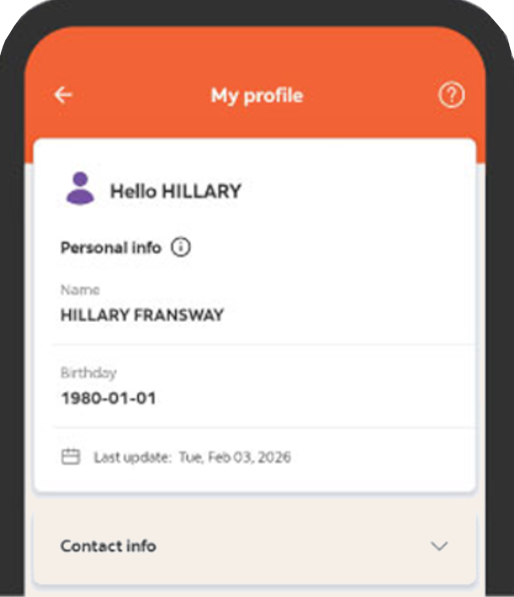
- Under Profile, you can edit your information- Phone, Email, Address, Employment, Tax.

What to take when updating in the branch
- Proof of address (Utility bill issued in the last 3 months)
- Valid photo ID (Passport or Drivers Licence)
- Proof of Income (Job letter or payslip)
Let's work together to ensure your client profile is always up to date by using the Scotia Caribbean mobile app or Scotia OnLine or by visiting your nearest Scotiabank Branch.